
TBet Tanzania Mobile App
Access TBet directly from your Android or iOS device through the mobile-optimized browser version. Place bets on Simba SC matches, spin slots and withdraw winnings to M-Pesa without downloading additional files.


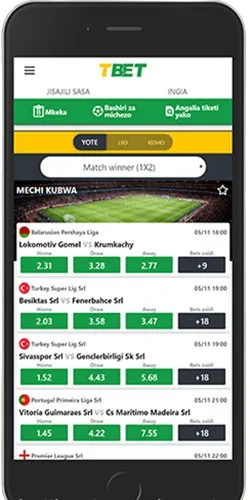
How to access TBet on mobile
TBet operates as a browser-based platform without requiring APK downloads or App Store installations. Open Chrome, Firefox or Safari on your phone and type tbet-tanzania.com in the address bar. The site detects your device automatically and displays the mobile interface within 3-4 seconds on 3G, faster on 4G networks in Dar es Salaam, Arusha and Mwanza.
Bookmark the site for quick access. On Android tap the three-dot menu in Chrome and select "Add to Home Screen" to create a shortcut icon. iPhone users tap the Share button in Safari then choose "Add to Home Screen". The icon appears on your home screen, launches the mobile site instead of a standalone application.
Device requirements
Any Android phone running version 7.0 or newer works with TBet's mobile site. Budget models from Tecno, Infinix and Samsung with 2GB RAM handle basic betting and casino games, crash games like Aviator run smoother on devices with 3GB RAM or more. iPhones running iOS 13 or later access TBet without issues, that includes iPhone 8 and all newer models.
Chrome version 90 or newer provides best experience but Firefox and Opera also work. Make sure JavaScript is enabled in browser settings, otherwise login forms won't function. A stable internet connection matters more than phone specs, 3G speeds of 2 Mbps suffice for most features except live streaming.
Mobile platform features
Live sports betting
Bet on football matches while they're happening with odds updating every 45-60 seconds. Mobile interface shows live scores for Tanzanian Premier League and Champions League fixtures.
Quick M-Pesa deposits
Deposit money through M-Pesa, Tigo Pesa or Airtel Money in under 2 minutes. Mobile deposit form saves your phone number after first use for faster transactions.
Casino games access
Play Aviator, slots and live dealer games from your phone. Crash games load within 5 seconds on 4G, slots take 7-8 seconds depending on provider.
Bet slip management
Build single bets or accumulators with up to 20 selections. Bet slip stays at bottom of screen, tap to review selections before placing wagers.
Account notifications
Receive SMS alerts for deposit confirmations, withdrawal approvals and bonus credits. Email notifications for password resets or KYC updates.
Fast withdrawals
Request payouts to mobile money through the interface. Most withdrawals process in 4-6 hours, funds arrive to M-Pesa, Tigo Pesa or Airtel Money.
Using TBet on your phone
The mobile interface prioritizes speed over visual polish. Navigation sits at bottom of screen within thumb reach, showing five icons for Home, Sports, Casino, Bet Slip and Account. Tap any icon to jump between sections, the platform remembers your last position so you don't restart from top every time.
Sports betting opens to live matches followed by upcoming fixtures in the next 24 hours. Scroll to find specific leagues or use search to type team names like "Simba" or "Young Africans". Match pages load in 2 seconds, displaying odds for 1X2, over/under 2.5 goals, both teams to score.
Placing bets through mobile
Tap any odds to add selections to your bet slip. The slip appears as a sliding panel from bottom, showing stake input and potential returns. Enter stake using number keyboard, minimum 1,000 TSh per bet slip. Confirm by tapping green "Place Bet" button, popup shows confirmation with unique ticket number. Winning bets credit automatically to balance.
Casino games on mobile
Casino section separates games into Crash, Slots, Live Dealer and Table Games tabs. Aviator sits at top of Crash category, loads in 3-4 seconds and runs smoothly on phones with 3GB RAM. Tap game thumbnail to open fullscreen mode. Live dealer games require 4G connection or stable WiFi, stream lags occasionally during peak evening hours 7-9 PM.
Deposits and withdrawals on mobile
Mobile money transactions happen faster through phone browser. Navigate to Account → Deposit, select M-Pesa, Tigo Pesa or Airtel Money. Enter amount between 10,000 TSh and 5,000,000 TSh, tap Continue. Platform generates payment reference and displays USSD code instructions.
Dial the code (*150*00# for M-Pesa, *150*01# for Tigo Pesa, *150*60# for Airtel Money), follow prompts to complete payment. Money appears in wallet within 2 minutes, occasionally 5 minutes during evening peaks. No fees from TBet, just standard operator charges.
Withdrawing winnings to mobile money
Withdrawal process requires completed KYC verification first. Go to Account → Withdraw, choose mobile money, enter phone number registered with M-Pesa, Tigo Pesa or Airtel Money. Minimum withdrawal 20,000 TSh, maximum 10,000,000 TSh per transaction but most users keep requests under 3,000,000 TSh for faster processing.
Submit request and wait for approval. Staff review withdrawals during business hours 9 AM to 6 PM, most approved within 3-4 hours on weekdays. Tuesday afternoons process faster, maybe 2 hours. Weekend requests sit until Monday unless submitted before 12 PM Saturday.
Common mobile issues and fixes
Site not loading properly
Clear browser cache and cookies. Chrome: three dots → Settings → Privacy → Clear Browsing Data. Safari: Settings → Safari → Clear History. Restart browser after clearing.
Login problems
Verify correct phone number and password. If locked after failed attempts wait 15 minutes. Use "Forgot Password" to reset via SMS.
Bet slip not working
Check JavaScript is enabled in browser settings. Some security apps block scripts. Disable VPN, TBet restricts access from certain VPN ranges.
Games won't load
Switch from 3G to 4G or WiFi. Casino games require minimum 2 Mbps speeds. Update browser to latest version if games fail to open.
Deposit not showing
Wait 5 minutes before contacting support, delays happen during peaks. Check mobile money history to confirm payment. Screenshot M-Pesa SMS if reporting missing deposit.
Withdrawal pending too long
Weekday requests process in 4-6 hours. Weekend submissions wait until Monday unless made before noon Saturday. Contact support after 8 hours weekdays, 48 hours weekends.
Mobile versus desktop experience
Mobile version strips visual elements for faster loading. You won't find promotional banners or multiple game categories displayed simultaneously like desktop. Streamlined approach reduces data usage—typical session consumes 15-20 MB compared to 30-40 MB on desktop.
Desktop shows more betting markets per match, mobile displays only popular options with "More Markets" button to expand. Live betting updates arrive slightly faster on desktop, maybe 30-40 seconds versus 45-60 on mobile. For basic pre-match betting and account management mobile handles everything fine. Power users building complex accumulators might prefer desktop's larger screen.